
Download Ensemble2 – Free Mac RSS Feed Reader
Overview
Ensemble2 is a lightweight, free RSS feed reader designed specifically for macOS users who value speed, simplicity, and a clean reading experience. First released in 2007, this Internet‑software tool has become a modest favorite among Mac enthusiasts who need a no‑frills solution for staying up‑to‑date with news, blogs, and podcasts. With a tiny footprint on disk—significantly smaller than many competing news aggregators—Ensemble2 loads feeds instantly and presents them in an uncluttered interface that feels native to the Mac environment.
Although the last official update (v0.5.1) was posted on May 8 2007, the application remains fully functional on Mac OS X and earlier versions, offering a reliable way to consolidate RSS streams without the bloat of modern, subscription‑heavy apps. Its English‑language UI, straightforward navigation, and free license make it an attractive option for users who want a secure, ad‑free feed reader that respects system resources. Whether you’re a journalist tracking multiple sources, a hobbyist following favorite blogs, or simply looking for a quick way to read headlines, Ensemble2 delivers a focused, dependable experience that aligns with the classic Mac philosophy of doing one thing well.
Key Features
- Ultra‑light design: Occupies less than 2 MB of disk space, keeping your Mac’s storage free for other tasks.
- Fast feed synchronization: Retrieves RSS updates within seconds, thanks to an efficient parsing engine.
- Native macOS look: Uses the system’s Aqua interface, ensuring seamless integration with other Mac applications.
- Simple folder organization: Group feeds into custom categories for quick navigation.
- Offline reading mode: Cache articles for later consumption without an internet connection.
- Customizable refresh intervals: Choose how often Ensemble2 checks for new items, balancing speed and bandwidth.
- Secure, ad‑free environment: No embedded advertisements or telemetry, preserving privacy.
- Free and open for personal use: No hidden fees, registration, or subscription required.
Installation & Usage Guide
Downloading the Installer
Start by visiting the official Ensemble2 download page or a trusted Mac software repository. The installer is typically offered as a .dmg file named Ensemble2_0.5.1.dmg. Click the download button, and macOS will place the file in your Downloads folder. Because the app is unsigned (due to its age), you may see a warning when opening the file. To proceed, right‑click the .dmg and select Open, then confirm that you want to run the installer.
Installing the Application
Once the disk image mounts, a window displays the Ensemble2 icon and an Applications shortcut. Drag the Ensemble2 icon onto the shortcut to copy it into your /Applications folder. After the copy finishes, eject the virtual disk by clicking the eject icon next to the mounted volume in Finder.
First‑Time Setup
Launch Ensemble2 from the Applications folder or Spotlight. On the first run, you’ll be prompted to grant permission for the app to access your network. Accept the request, and the main window appears with a blank feed list.
Click the + Add Feed button, paste the URL of an RSS or Atom feed, and press Enter. The feed will be validated and added to your library. Repeat the process to import as many feeds as you need.
Using the Reader Efficiently
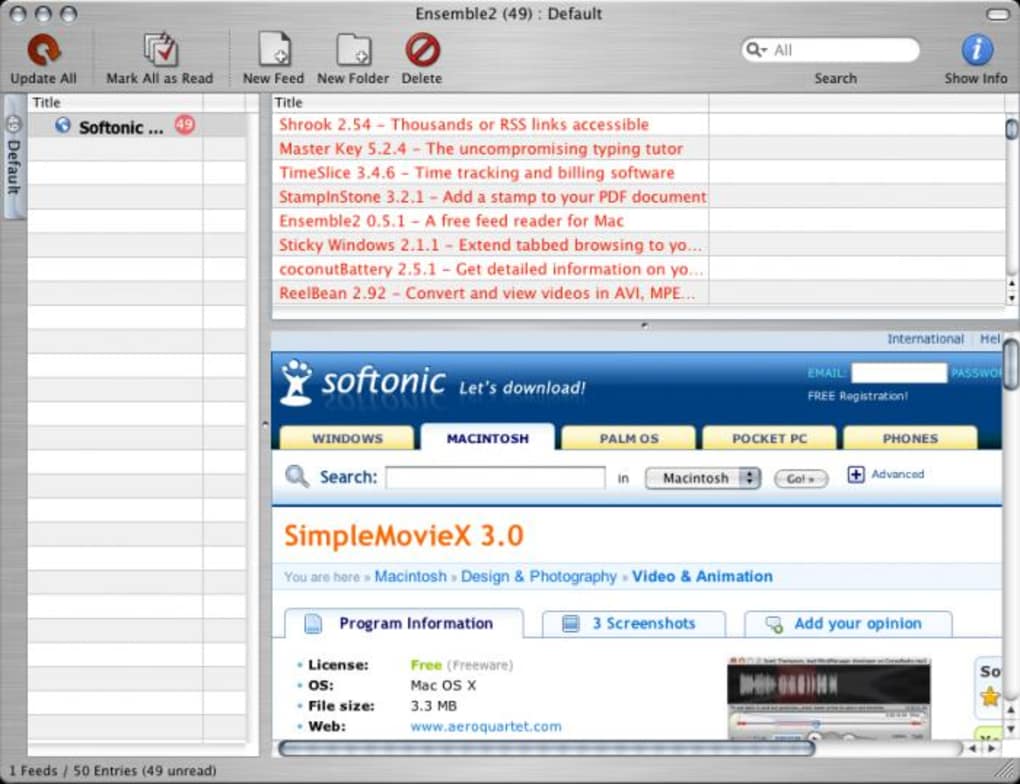
Ensemble2 presents feeds in a two‑pane layout: the left pane shows your folder hierarchy, while the right pane displays article headlines. Click a headline to preview the article in the built‑in viewer, or double‑click to open the full content in your default web browser. Use the Refresh button to manually pull the latest updates, or rely on the automatic interval you set in Preferences > Update Settings. To mark items as read, select them and press Space. The app also supports keyboard shortcuts for quick navigation, such as ⌘+R to refresh all feeds.
Troubleshooting Common Issues
If a feed fails to load, verify the URL and ensure the source is still active. Because Ensemble2 uses an older SSL library, some modern HTTPS feeds may require a manual workaround—copy the feed’s HTTP version if available. For performance concerns, reduce the number of simultaneously active folders or increase the refresh interval. Should the app crash, delete the preferences file located at ~/Library/Preferences/com.ensemble2.plist and restart the program; this resets configuration without losing your subscribed feeds.
Compatibility, Pros & Cons
System Compatibility
Ensemble2 runs on macOS 10.2 (Jaguar) through macOS 10.5 (Leopard) and earlier versions of Mac OS X. It is compatible with both Intel‑based Macs and legacy PowerPC hardware, making it a viable option for older machines that cannot support newer, resource‑intensive RSS readers.
Pros
- Extremely small download size and minimal RAM usage.
- Fast, responsive interface that feels native to classic macOS.
- No ads, tracking, or subscription fees—completely free.
- Easy to set up and manage feeds without unnecessary complexity.
- Works offline by caching articles for later reading.
Cons
- Last official update was in 2007; no modern security patches.
- Lacks support for newer feed formats such as JSON‑Feed.
- No built‑in social sharing or advanced filtering options.
- Interface may appear dated on macOS versions newer than Leopard.
- Limited documentation and community support compared to mainstream readers.
Frequently Asked Questions
Is Ensemble2 still maintained by its developers?
Ensemble2 has not received an official update since version 0.5.1 in May 2007. The original developers have discontinued active maintenance, so the software is considered legacy. However, it still runs reliably on supported macOS versions.
Can Ensemble2 read HTTPS feeds?
The built‑in SSL support is based on older libraries, which may cause issues with some modern HTTPS endpoints. If a feed fails to load, try using its HTTP version or switch to a newer RSS reader for that particular source.
Is there a portable version of Ensemble2?
No official portable version exists. Because the app relies on macOS frameworks, it must be installed in the /Applications folder to function correctly.
How can I back up my feed list?
Ensemble2 stores its feed list in a preferences file located at ~/Library/Preferences/com.ensemble2.plist. Copy this file to a safe location (e.g., external drive or cloud storage) before reinstalling or upgrading macOS.
Does Ensemble2 support podcast (audio) feeds?
While Ensemble2 can display the metadata of podcast RSS feeds, it does not include a built‑in audio player. You can click the enclosure link to open the episode in your default media player.
Conclusion & Call to Action
Ensemble2 remains a compelling choice for Mac users who prioritize speed, minimalism, and a completely free RSS solution. Its tiny footprint and native look make it especially suitable for older Macs that struggle with the resource demands of contemporary news aggregators. Although the software lacks recent security updates and modern features, it delivers a solid core experience for reading and organizing feeds without distraction. If you own a compatible Mac and need a straightforward tool to keep up with your favorite blogs, news sites, or podcasts, Ensemble2 is ready to download and use right now.
Ready to give Ensemble2 a try? Download Ensemble2 now and start consolidating your feeds in a fast, secure, and ad‑free environment.







